> ## Documentation Index
> Fetch the complete documentation index at: https://docs.bosscart.io/llms.txt
> Use this file to discover all available pages before exploring further.
# Video Automation
> With video automation, users can trigger various events based on video interaction. These automated workflows enable personalized engagement, notifications, and profile updates.
With **video automation**, users can trigger various events based on video interaction. These automated workflows enable **personalized engagement, notifications, and profile updates**.
**Automation Triggers:**
* **Reaction to a Post** – Activates when a subscriber reacts to a video post.
* **Poll Option Submitted** – Triggers when a viewer submits an answer in an interactive poll.
* **Video Started** – Initiates an automation as soon as a viewer begins watching the video.
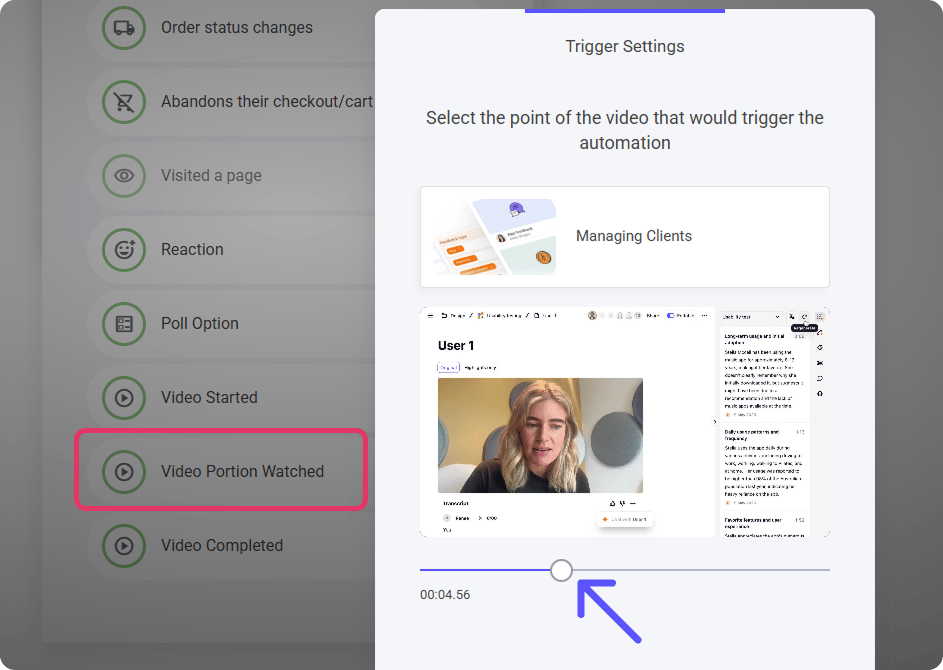
* **Video Portion Watched** – Fires after a certain percentage of the video has been viewed, ideal for tracking engagement.
* **Video Completed** – Automatically triggers once the viewer has watched the entire video.
These triggers can send **emails, update user profiles, enroll viewers into sequences**, and more, making **content engagement smarter and more dynamic**.
### Video Portion Watched
This trigger allows you to activate automations when a viewer watches a specific portion of a video.
**How It Works:**
1. **Select the video** – Choose which video the automation will apply to.
2. **Adjust the timeline** – Use the **slider** to set the exact point in the video where the trigger should activate.
3. **Enable automated actions** – Once the viewer reaches the specified point, it can **send emails, update profiles, or trigger follow-up workflows**.
This helps create **targeted engagement** by responding to viewer behavior at precise moments.
 #### **Quick Setup for Basic Video Triggers**
For straightforward automation triggers like **"Video Started"** and **"Video Completed,"** the setup is simple:
1. **Select the trigger** – Choose either **Video Started** (activates when a viewer begins watching) or **Video Completed** (fires when the video reaches the end).
2. **Select the video** – Pick which video the automation applies to.
That's it! These triggers ensure **automated actions**—like sending emails or updating profiles—activate effortlessly without extra configuration.
**Note:** For the video automation triggers to function, the member/contact needs to an active Email list subscriber.
[Messaging & Workflows](/builder/platform/messaging-and-workflows)
#### **Quick Setup for Basic Video Triggers**
For straightforward automation triggers like **"Video Started"** and **"Video Completed,"** the setup is simple:
1. **Select the trigger** – Choose either **Video Started** (activates when a viewer begins watching) or **Video Completed** (fires when the video reaches the end).
2. **Select the video** – Pick which video the automation applies to.
That's it! These triggers ensure **automated actions**—like sending emails or updating profiles—activate effortlessly without extra configuration.
**Note:** For the video automation triggers to function, the member/contact needs to an active Email list subscriber.
[Messaging & Workflows](/builder/platform/messaging-and-workflows)