> ## Documentation Index
> Fetch the complete documentation index at: https://docs.bosscart.io/llms.txt
> Use this file to discover all available pages before exploring further.
# Pricing Comparison
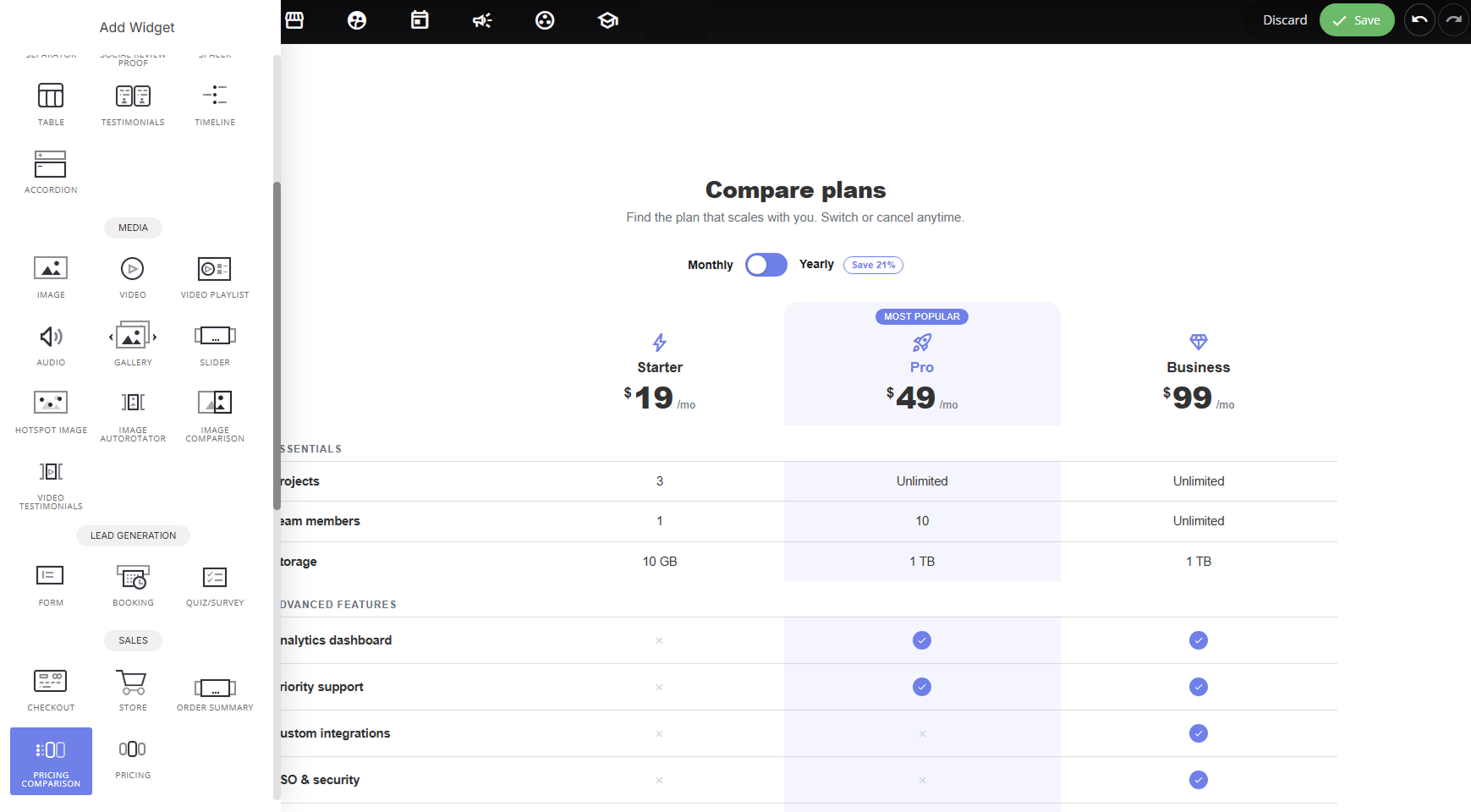
> This element is a purpose-built pricing table for showcasing multiple plans side by side, combining plan names, pricing, feature lists, and CTAs into one cohesive block. It's...
This element is a purpose-built pricing table for showcasing multiple plans side by side, combining plan names, pricing, feature lists, and CTAs into one cohesive block. It's more specialized than a general table, with built-in support for monthly/yearly billing toggles, featured plan highlighting, and per-plan buttons.
 #### **Why use it:**
* **Simplifies plan comparison**: visitors can quickly scan features across tiers and see exactly what they get at each price point.
* **Guides visitors toward the right plan**: highlighting a "**Most Popular**" or featured plan nudges undecided visitors toward your recommended option.
* **Supports flexible billing**: the built-in Monthly/Yearly toggle (with a "Save X%" badge) lets you promote annual plans without building separate sections.
* **Conversion-ready**: each plan includes its own button with custom text and link, so visitors can act immediately from the pricing table itself.
### **Layout Options:**
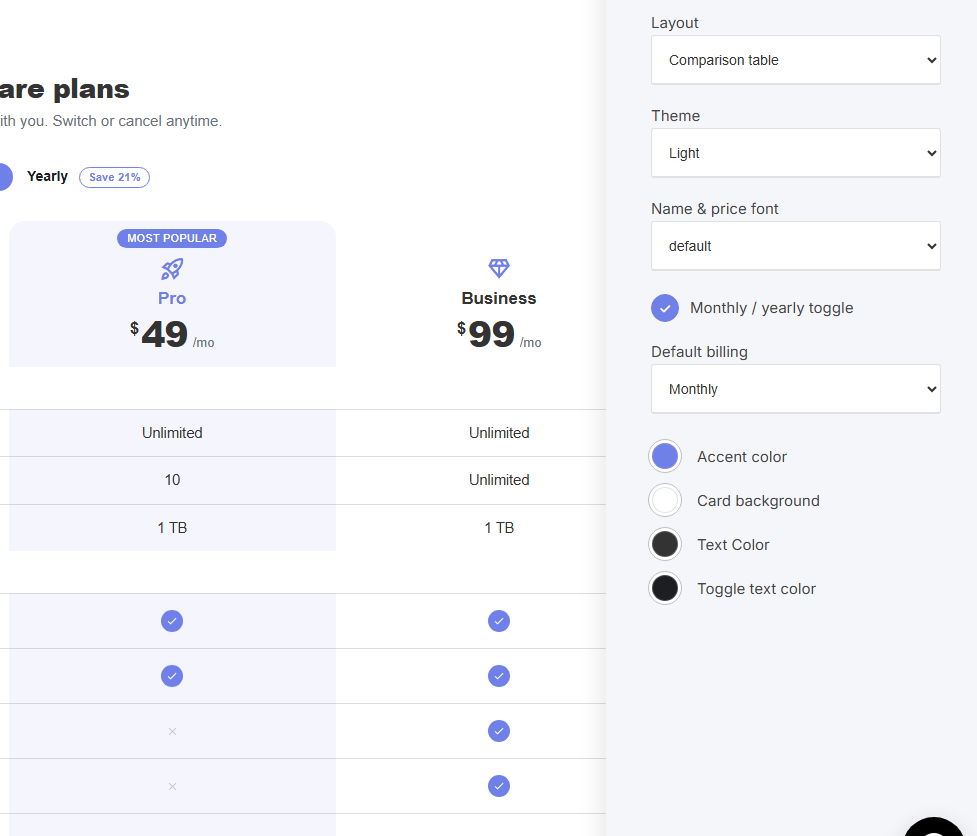
**Comparison table:** plans display as columns in a single table with shared feature rows. Best for more plans or more detailed feature-by-feature comparison.
#### **Why use it:**
* **Simplifies plan comparison**: visitors can quickly scan features across tiers and see exactly what they get at each price point.
* **Guides visitors toward the right plan**: highlighting a "**Most Popular**" or featured plan nudges undecided visitors toward your recommended option.
* **Supports flexible billing**: the built-in Monthly/Yearly toggle (with a "Save X%" badge) lets you promote annual plans without building separate sections.
* **Conversion-ready**: each plan includes its own button with custom text and link, so visitors can act immediately from the pricing table itself.
### **Layout Options:**
**Comparison table:** plans display as columns in a single table with shared feature rows. Best for more plans or more detailed feature-by-feature comparison.
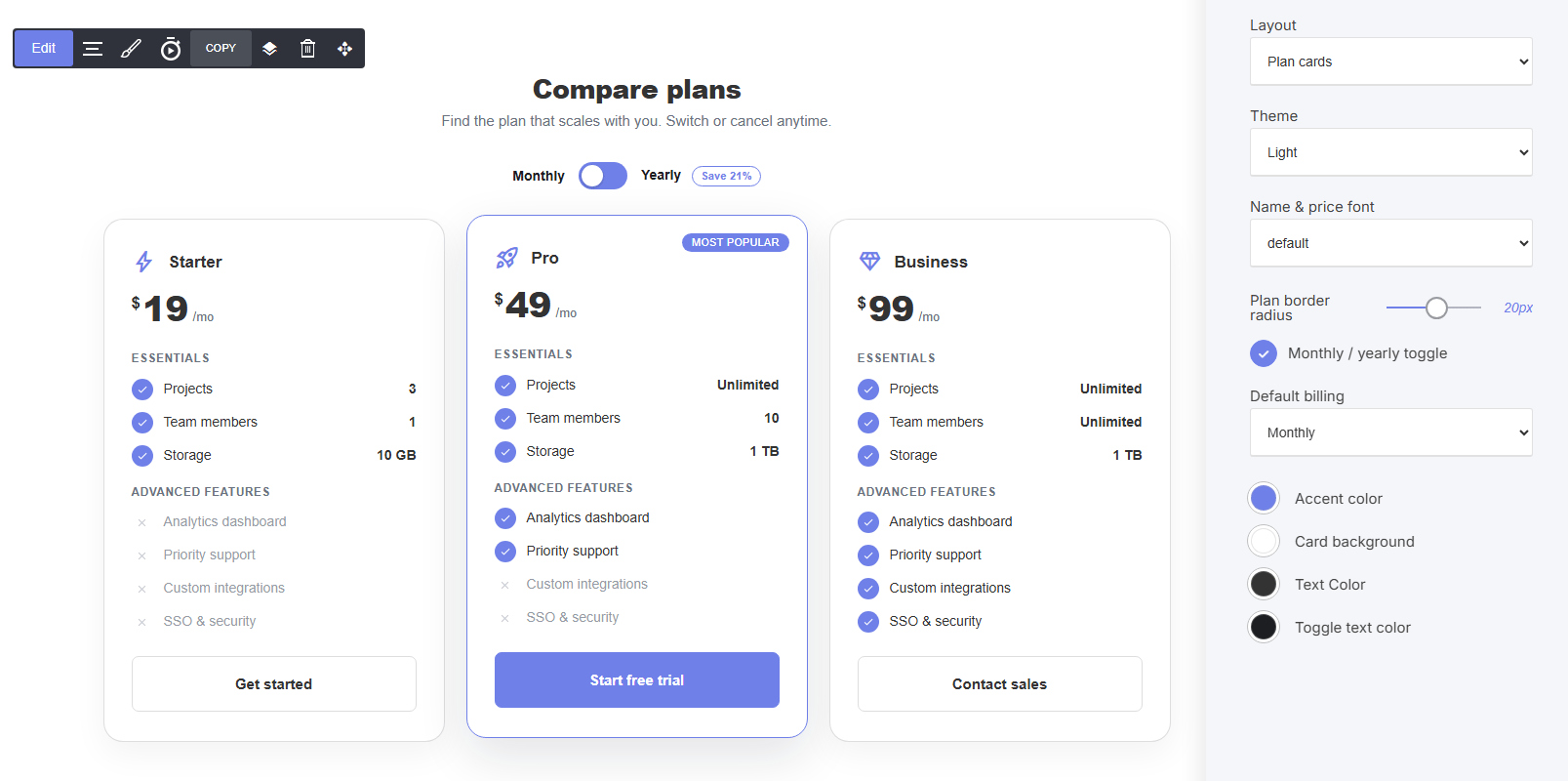
 **Plan cards**: each plan displays as an individual card with its own icon, price, feature checklist, and CTA button. Best for fewer plans (2–4) where visual separation matters.
 ### **Per Plan Settings:**
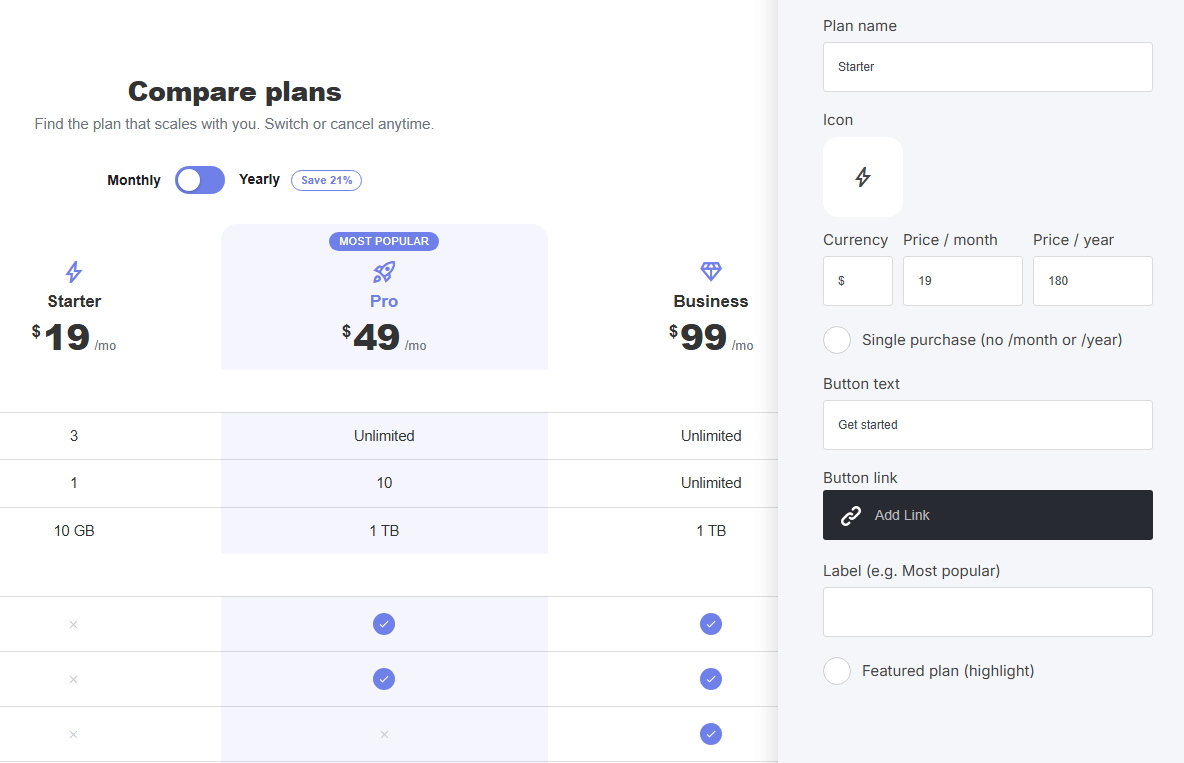
* **Plan name & Icon**: name and visual identifier for the tier
* **Currency, Price / month, Price / year**: pricing shown depending on billing toggle
* **Single purchase (no /month or /year)**: for one-time payment plans instead of subscriptions
* **Button text & Button link**: the CTA (e.g., "Get started," "Start free trial")
* **Label**: badge text (e.g., "Most Popular")
* **Featured plan (highlight)**: visually emphasize one plan over the others
### **Per Plan Settings:**
* **Plan name & Icon**: name and visual identifier for the tier
* **Currency, Price / month, Price / year**: pricing shown depending on billing toggle
* **Single purchase (no /month or /year)**: for one-time payment plans instead of subscriptions
* **Button text & Button link**: the CTA (e.g., "Get started," "Start free trial")
* **Label**: badge text (e.g., "Most Popular")
* **Featured plan (highlight)**: visually emphasize one plan over the others
 ### **Shared Styling Settings:**
* **Theme**: Light/Dark
* **Name & price font**: typography control
* **Plan border radius**: corner rounding
* **Monthly / yearly toggle**: show/hide the billing switch
* **Default billing**: which billing period displays by default
* **Accent color, Card background, Text Color, Toggle text color**: full color customization
### **Managing Plans & Features**
Beyond the per-plan and styling settings, the widget has a dedicated structure panel for building out the table itself.
### **Shared Styling Settings:**
* **Theme**: Light/Dark
* **Name & price font**: typography control
* **Plan border radius**: corner rounding
* **Monthly / yearly toggle**: show/hide the billing switch
* **Default billing**: which billing period displays by default
* **Accent color, Card background, Text Color, Toggle text color**: full color customization
### **Managing Plans & Features**
Beyond the per-plan and styling settings, the widget has a dedicated structure panel for building out the table itself.
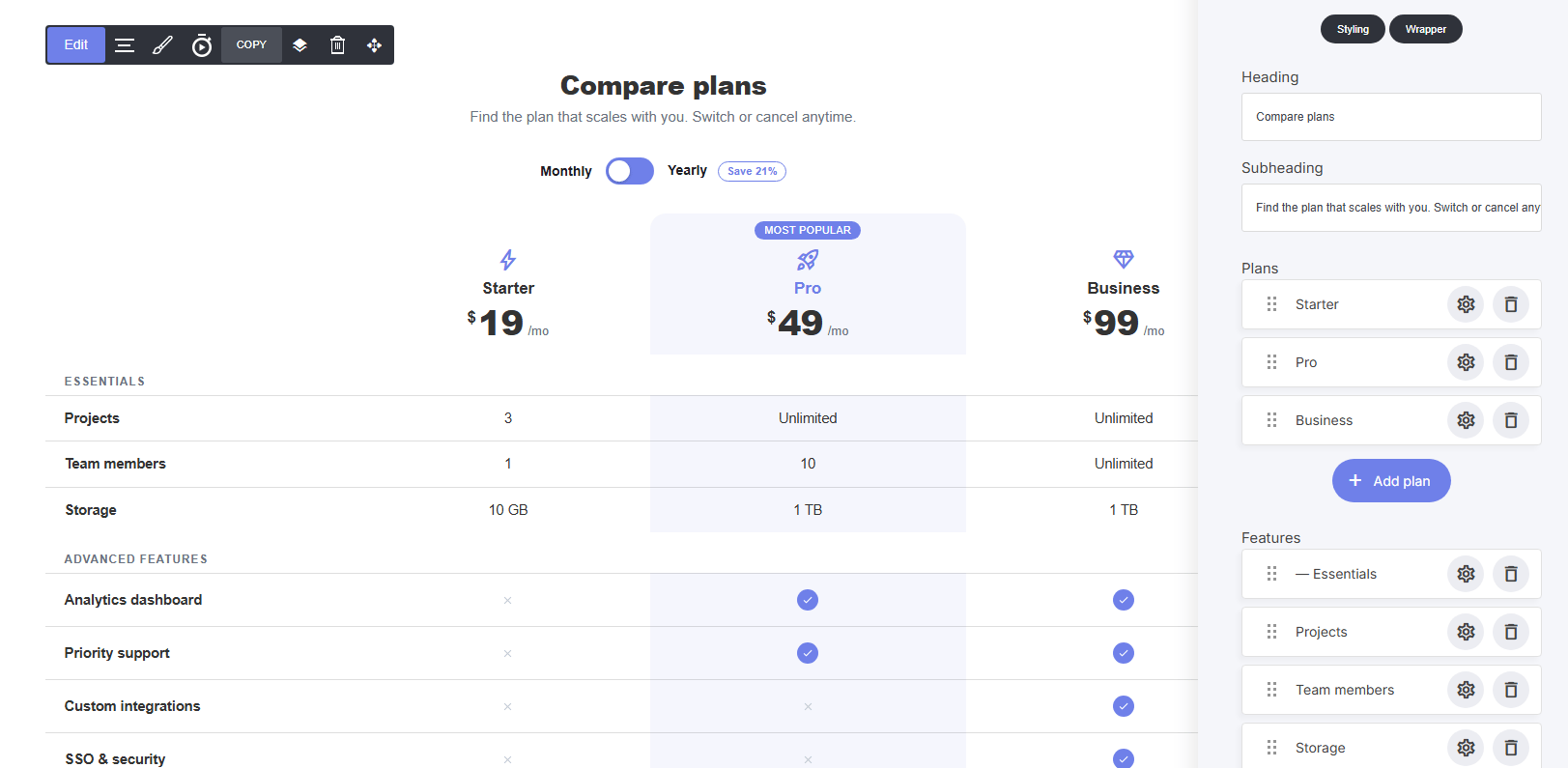 ### **Section headings:**
**Heading / Subheading** — the title and supporting text above the table (e.g., "Compare plans" / "Find the plan that scales with you...")
### **Adding & managing plans:**
* Each plan (Starter, Pro, Business, etc.) appears as its own row in the **Plans** list
* Click **+ Add plan** to create a new plan column
* Drag the handle to reorder plans left to right
* Click the gear icon on any plan to edit its details (name, price, button, etc. As covered in the per-plan settings)
* Delete a plan with the trash icon
### **Adding & managing features:**
* Features are listed and organized under the **Features** section, including group headers (e.g., "Essentials," "Advanced Features") to visually separate categories
* Add new feature rows the same way, drag to reorder, click the gear to edit the feature name and set its value per plan (e.g., "Unlimited," "10 GB," or a checkmark/✗), delete with the trash icon
* Group headers help organize longer feature lists so the table doesn't feel like one long list
### **Why this structure matters:**
* Keeping plans and features as separate, reorderable lists means you can restructure your pricing table (add a new tier, reorder features, regroup categories) without rebuilding the whole widget from scratch.
### **Section headings:**
**Heading / Subheading** — the title and supporting text above the table (e.g., "Compare plans" / "Find the plan that scales with you...")
### **Adding & managing plans:**
* Each plan (Starter, Pro, Business, etc.) appears as its own row in the **Plans** list
* Click **+ Add plan** to create a new plan column
* Drag the handle to reorder plans left to right
* Click the gear icon on any plan to edit its details (name, price, button, etc. As covered in the per-plan settings)
* Delete a plan with the trash icon
### **Adding & managing features:**
* Features are listed and organized under the **Features** section, including group headers (e.g., "Essentials," "Advanced Features") to visually separate categories
* Add new feature rows the same way, drag to reorder, click the gear to edit the feature name and set its value per plan (e.g., "Unlimited," "10 GB," or a checkmark/✗), delete with the trash icon
* Group headers help organize longer feature lists so the table doesn't feel like one long list
### **Why this structure matters:**
* Keeping plans and features as separate, reorderable lists means you can restructure your pricing table (add a new tier, reorder features, regroup categories) without rebuilding the whole widget from scratch.