> ## Documentation Index
> Fetch the complete documentation index at: https://docs.bosscart.io/llms.txt
> Use this file to discover all available pages before exploring further.
# Sales Tracking
> Sales Tracking for Email & Automations
## Sales Tracking for Email & Automations
Launching a funnel? Sending a flash offer? Now you can see exactly what’s converting in your emails.
Our built-in sales tracking lets you monitor real revenue from every email and automation flow — no third-party tools required. Check opens, clicks, conversions, and total revenue at a glance. Whether you're testing a nurture sequence or selling a full digital product, your data lives right where you work.
**Track sales. Spot friction. Optimize faster.** Let’s break down how it works →
### How it Works
Tracks sales by linking your email and automation clicks to checkout activity — all through smart, automatic UTM tagging.
**Every link** in your email or automation flow is tagged behind the scenes with UTM parameters like `utm_campaign`, `utm_source`, and `utm_content`, so when a user clicks and makes a purchase, it connects that revenue to the original message.
No manual setup. No external analytics tools. Just insights that drive better copy, better flows, and better results.
> 📘 Example: Someone clicks a “30% off” button in your welcome email. If they buy, you’ll see that sale tracked under that exact email — including how much revenue it generated.
**Behind the scenes, but fully visible where it matters.**
Read more about UTM [**Here**](/builder/platform/ecommerce/tracking-links)
Sales tracking can be used in both Email and SMS, whether that be via campaigns or in your automation workflows. First lets take a look at setting up the Sales tracking in emails:
 #### Enabling Sales Tracking for a Campaign
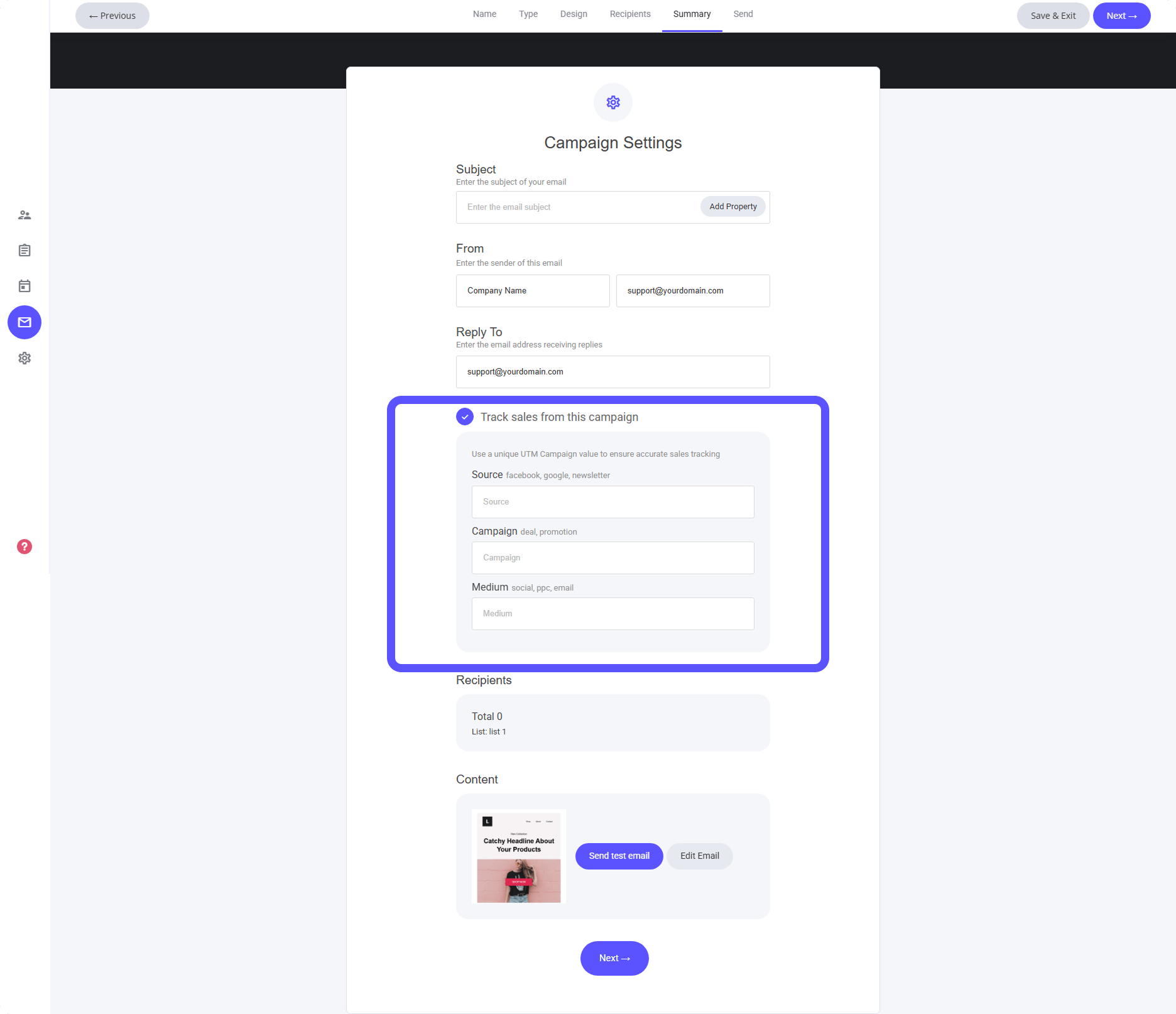
In the email campaign builder, head to the **Summary** tab. There, you’ll see the option **"Track sales from this campaign."**
Once enabled, simply add your UTM parameters — and that's it. Every sale driven by this email will be tracked automatically, no extra setup needed.
**Real clicks, real conversions, real revenue.** All linked directly to the message that moved your audience to act.
#### Enabling Sales Tracking in your automations
Sales tracking works seamlessly inside your automation emails — using the same smart UTM setup as your campaigns.
When editing an automation flow:
* Open the email you want to track (individually or apply tracking across multiple emails).
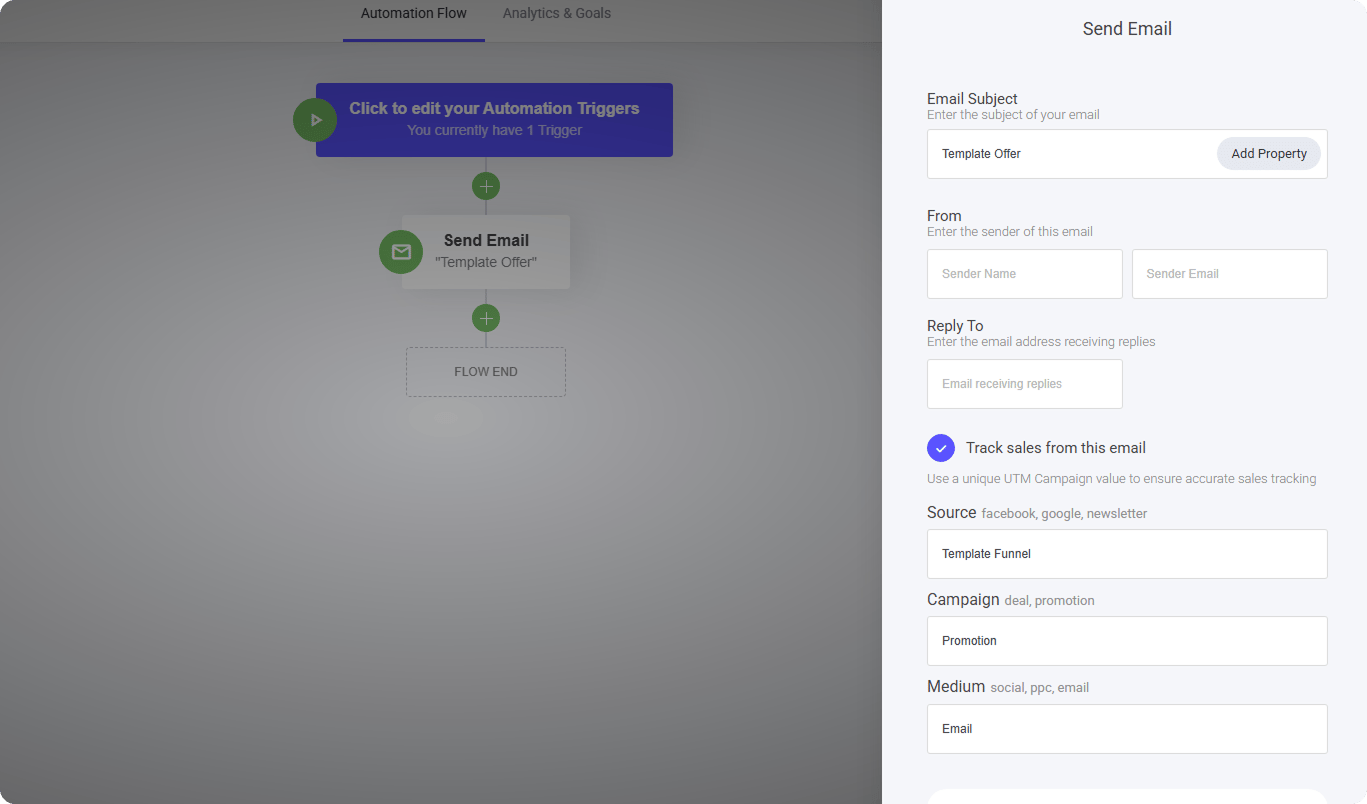
* Toggle **"Track sales from this email."**
* Add your UTM parameters — this will link every sale back to the email that drove it.
**Automated flows. Real-time sales insight. Zero guesswork.**
#### Enabling Sales Tracking for a Campaign
In the email campaign builder, head to the **Summary** tab. There, you’ll see the option **"Track sales from this campaign."**
Once enabled, simply add your UTM parameters — and that's it. Every sale driven by this email will be tracked automatically, no extra setup needed.
**Real clicks, real conversions, real revenue.** All linked directly to the message that moved your audience to act.
#### Enabling Sales Tracking in your automations
Sales tracking works seamlessly inside your automation emails — using the same smart UTM setup as your campaigns.
When editing an automation flow:
* Open the email you want to track (individually or apply tracking across multiple emails).
* Toggle **"Track sales from this email."**
* Add your UTM parameters — this will link every sale back to the email that drove it.
**Automated flows. Real-time sales insight. Zero guesswork.**
 #### Viewing Sales Data in Your Email Analytics
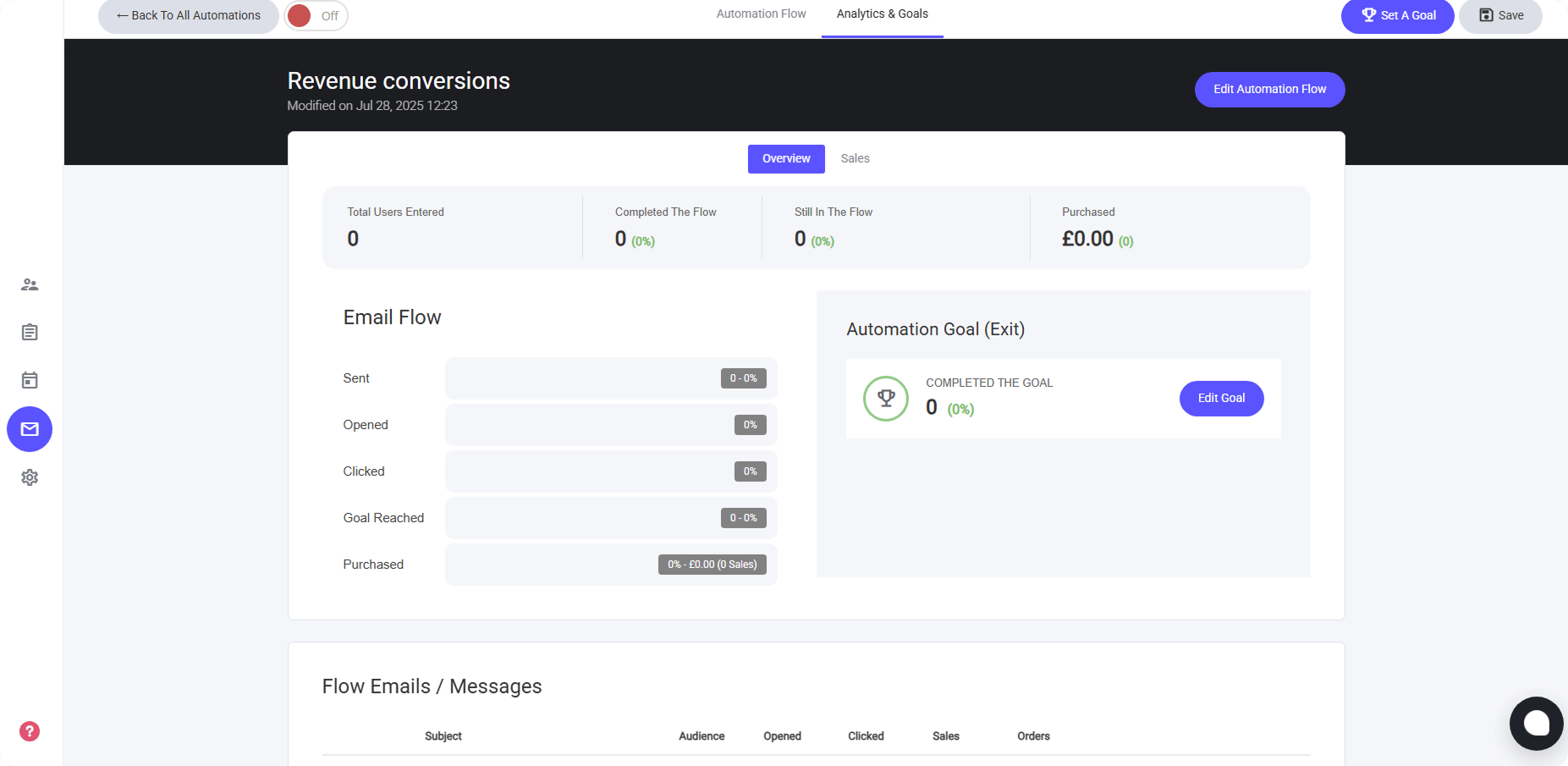
Email analytics give you a full picture — not just who opened and clicked, but who actually bought.
Under each campaign or automation email, you’ll now see:
* **Opened** — Total recipients who viewed your message
* **Clicked** — Those who engaged with your links
* **Sales** — Revenue generated from this email
* **Orders** — Number of purchases directly attributed
💡 Revenue tracking is powered by UTM data, so every sale is linked to the exact email that drove it.
**See what converts. Refine what doesn’t.** Real insight, right where you write.
#### Viewing Sales Data in Your Email Analytics
Email analytics give you a full picture — not just who opened and clicked, but who actually bought.
Under each campaign or automation email, you’ll now see:
* **Opened** — Total recipients who viewed your message
* **Clicked** — Those who engaged with your links
* **Sales** — Revenue generated from this email
* **Orders** — Number of purchases directly attributed
💡 Revenue tracking is powered by UTM data, so every sale is linked to the exact email that drove it.
**See what converts. Refine what doesn’t.** Real insight, right where you write.
 #### Advanced Sales Insights
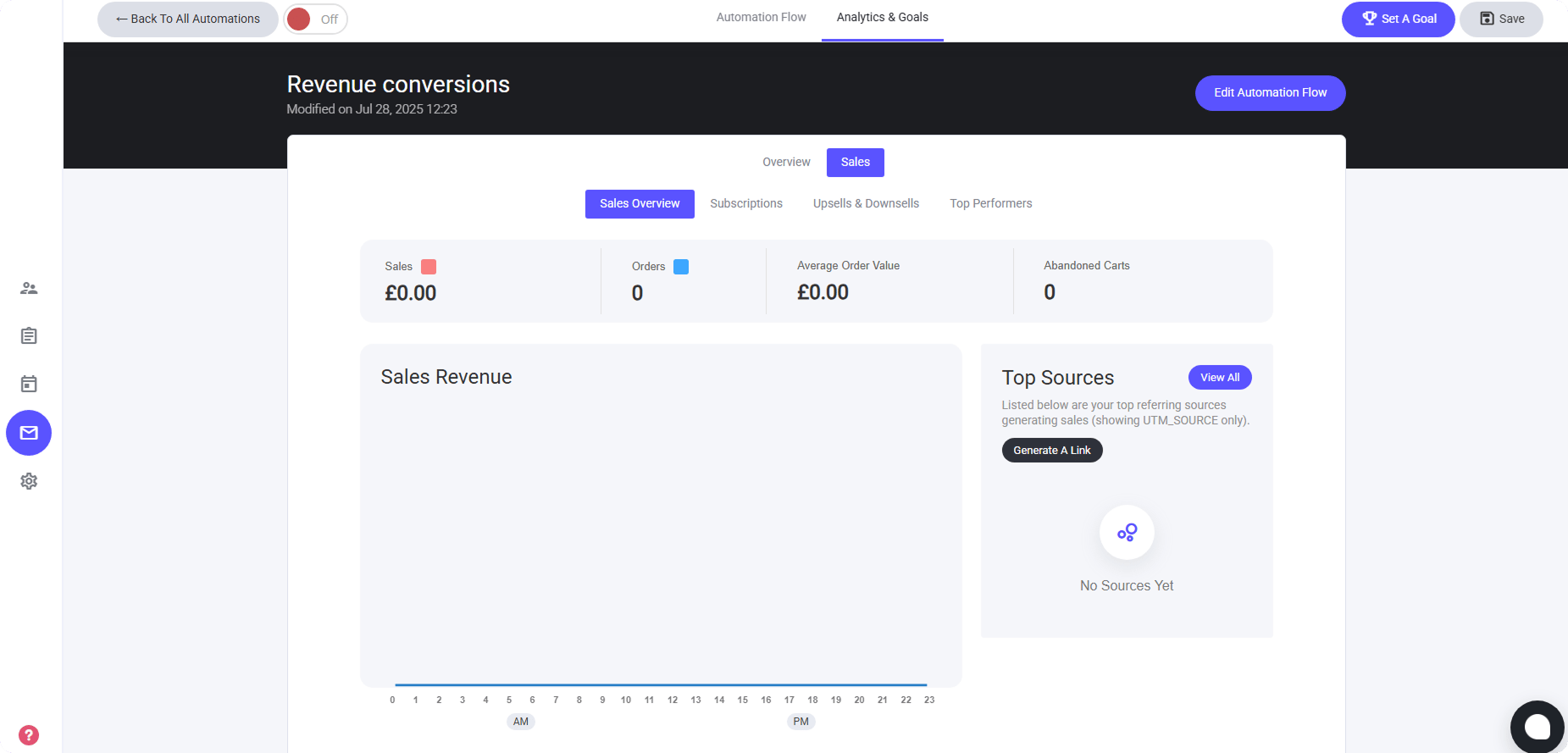
Beyond opens and clicks, break down revenue by product — giving you full visibility into what’s actually converting.
Here’s what you’ll see in your **Email & Automation Analytics**:
* **Item-level sales** — track revenue from individual products, templates, or course bundles
* **Subscriptions** — monitor recurring revenue from memberships and ongoing access
* **Upsells & Downsells** — see which offer paths are boosting AOV or saving abandoned carts
* **Top-performing products** — ranked by revenue, conversion rate, or volume
💡 Use these insights to double down on high performers, refine your offer stack, and remove what’s not landing.
[
#### Advanced Sales Insights
Beyond opens and clicks, break down revenue by product — giving you full visibility into what’s actually converting.
Here’s what you’ll see in your **Email & Automation Analytics**:
* **Item-level sales** — track revenue from individual products, templates, or course bundles
* **Subscriptions** — monitor recurring revenue from memberships and ongoing access
* **Upsells & Downsells** — see which offer paths are boosting AOV or saving abandoned carts
* **Top-performing products** — ranked by revenue, conversion rate, or volume
💡 Use these insights to double down on high performers, refine your offer stack, and remove what’s not landing.
[
](/builder/platform/messaging-and-workflows/automation-overview)