> ## Documentation Index
> Fetch the complete documentation index at: https://docs.bosscart.io/llms.txt
> Use this file to discover all available pages before exploring further.
# Blog Article Tags
> Tags help segment content and allow readers to filter posts based on relevant topics.
Tags help **segment content** and allow readers to filter posts based on relevant topics.
**How to Add Tags to Blog Posts:**
1. **Open the Blog Article/Post** – Navigate to the post you want to tag.
2. **Access Post Settings** – Click the settings menu.
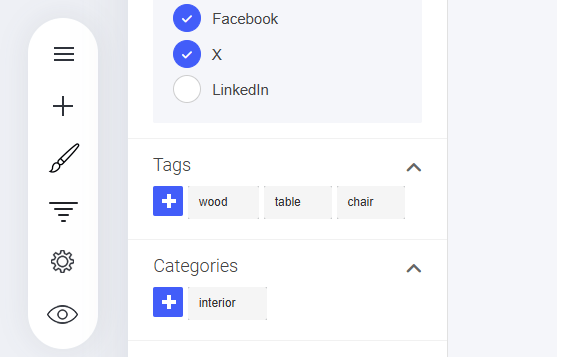
3. **Find the ‘Tags’ Section** – Look for the area where tags can be assigned.
4. **Click the ‘+’ Button** – Open the tag input field.
5. **Type or Select a Tag** – Choose relevant keywords to categorize the post.
6. **Save Your Changes** – Ensure tags are applied for easier content filtering.
A **simple yet effective** way to improve blog navigation and content discoverability!
 ### How To Display Your Blog Tags
Tags will be displayed below your article.
### Custom Tag Displays
You can also display the tags in your sidebar (or anywhere else on your site) by using the [Blog widget](/builder/platform/widgets/other/blog). Here's how\...
* Drag the Blog Widget into where you want it on your page.
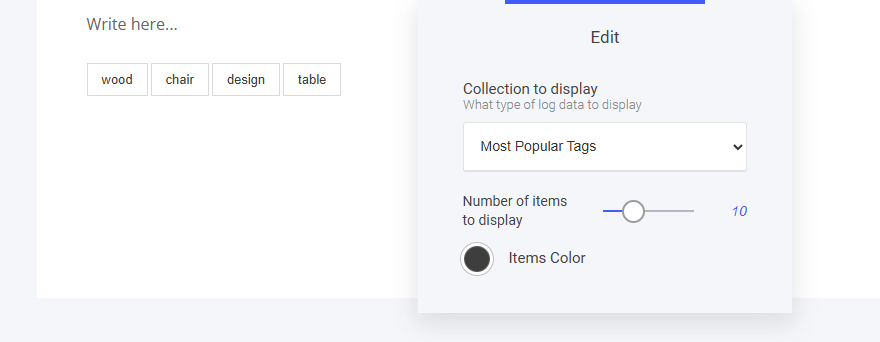
* Select **'Most Popular Tags'** from the drop-down menu in the widget settings.
### How To Display Your Blog Tags
Tags will be displayed below your article.
### Custom Tag Displays
You can also display the tags in your sidebar (or anywhere else on your site) by using the [Blog widget](/builder/platform/widgets/other/blog). Here's how\...
* Drag the Blog Widget into where you want it on your page.
* Select **'Most Popular Tags'** from the drop-down menu in the widget settings.